Author: javirodz

  • Objective 4.01 Compare and contrast positive and negative security models

    Positive Security Model

    The two approaches to security most often mentioned in the context of application security— positive and negative—are diametrically opposed in all of their characteristic behaviors, but they are structured very similarly. Both positive and negative security approaches operate according to an established set of rules. Access Control Lists (ACLs) and signatures are two implementation examples of positive and negative security rules, respectively. Positive security moves away from “blocked,” end of the spectrum, following an “allow only what I know” methodology. Every rule added to a positive security model increases what is classified as known behavior, and thus allowed, and decreases what is blocked, or what is unknown. Therefore, a positive security model with nothing defined should block everything and relax (i.e., allow broader access) as the acceptable content contexts are defined. 
     

    Negative Security Model

    At the opposite end of the spectrum, negative security moves towards “blocked what I know is bad,” meaning it denies access based on what has previously identified as content to be blocked, running opposite to the known/allowed positive model. Every rule added to the negative security policy increases the blocking behavior, thereby decreasing what is both unknown and allowed as the policy is tightened. Therefore, a negative security policy with nothing defined would grant access to everything, and be tightened as exploits are discovered .


    Pros and Cons

    Although negative security does retain some aspect of known data, negative security knowledge comes from a list of very specific repositories of matching patterns. As data is passed through a negative security policy, it is evaluated against individual known “bad” patterns. If a known pattern is matched, the data is rejected; if the data flowing through the policy is unidentifiable, it is allowed to pass. Negative security policies do not take into account how the application works, they only notice what accesses the application and if that access violates any negative security patterns. Discussions on preferred security methods typically spawn very polarized debates. Tried and true security engineers might ardently argue the merits of the positive security model because it originates from the most “secure” place—“Only allow what I know and expect.” Many any business pundits would argue that the negative model is the best as it starts in the most “functional” place— “Block what I know is bad and let everything unknown through.” Both groups are correct and yet both opinions become irrelevant when projected onto applied security, because both positive and negative security are theoretical. Applied security falls somewhere in the middle of the spectrum, providing a practical balance. At some point, as

    the negative approach is tightened, it will take on characteristics of a more positive model, inching towards a more complete security approach. Likewise, as a positive security model is loosened to accommodate new application behaviors, wit will take on some aspects of a more negative approach, such as implementing data pattern matching, to block the more predictable attacks. As a positive policy continues to relax, it will move
    closer towards complete functionality. The point at which these two opposing concepts begin to overlap is where applied security starts to take shape.
  • Objective 3.02 Differentiate between a client and server

    Client–server model

    The client–server model is a distributed application structure in computing that partitions tasks or workloads between the providers of a resource or service, called servers, and service requesters, called clients.
    The client–server characteristic describes the relationship of cooperating programs in an application. The server component provides a function or service to one or many clients, which initiate requests for such services. The model assigns one of two roles to the computers in a network: Client or server. A server is a computer system that selectively shares its resources; a client is a computer or computer program that initiates contact with a server in order to make use of a resource. Data, CPUs, printers, and data storage devices are some examples of resources.
  • Objective 3.01 Discuss the purpose of, use cases for, and key considerations related to load balancing.

    Distributing the load across multiple servers.

    Successful load balancing optimizes resource use, maximizes throughput, minimizes response time, and avoids overload. Using multiple components with load balancing instead of a single component may increase reliability through redundancy.

    Load Balancing Algorithms

    A variety of scheduling algorithms are used by load balancers to determine which backend server to send a request to. Simple algorithms include random choice or round robin. More sophisticated load balancers may take into account additional factors, such as a server’s reported load, recent response times, up/down status (determined by a monitoring poll of some kind), number of active connections, geographic location, capabilities, or how much traffic it has recently been assigned.

    Session Persistence

    An important issue when operating a load-balanced service is how to handle information that must be kept across the multiple requests in a user’s session. If this information is stored locally on one backend server, then subsequent requests going to different backend servers would not be able to find it. This might be cached information that can be recomputed, in which case load-balancing a request to a different backend server just introduces a performance issue.

    One solution to the session data issue is to send all requests in a user session consistently to the same backend server. This is known as persistence or stickiness. A significant downside to this technique is its lack of automatic failover: if a backend server goes down, its per-session information becomes inaccessible, and any sessions depending on it are lost. The same problem is usually relevant to central database servers; even if web servers are “stateless” and not “sticky”, the central database is (see below).

    Assignment to a particular server might be based on a username, client IP address, or by random assignment. Because of changes of the client’s perceived address resulting from DHCP, network address translation, and web proxies this method may be unreliable. Random assignments must be remembered by the load balancer, which creates a burden on storage. If the load balancer is replaced or fails, this information may be lost, and assignments may need to be deleted after a timeout period or during periods of high load to avoid exceeding the space available for the assignment table. The random assignment method also requires that clients maintain some state, which can be a problem, for example when a web browser has disabled storage of cookies. Sophisticated load balancers use multiple persistence techniques to avoid some of the shortcomings of any one method.

    Another solution is to keep the per-session data in a database. Generally this is bad for performance since it increases the load on the database: the database is best used to store information less transient than per-session data. To prevent a database from becoming a single point of failure, and to improve scalability, the database is often replicated across multiple machines, and load balancing is used to spread the query load across those replicas. Microsoft’s ASP.net State Server technology is an example of a session database. All servers in a web farm store their session data on State Server and any server in the farm can retrieve the data.

    Fortunately there are more efficient approaches. In the very common case where the client is a web browser, per-session data can be stored in the browser itself. One technique is to use a browser cookie, suitably time-stamped and encrypted. Another is URL rewriting. Storing session data on the client is generally the preferred solution: then the load balancer is free to pick any backend server to handle a request. However, this method of state-data handling is not really suitable for some complex business logic scenarios, where session state payload is very big or recomputing it with every request on a server is not feasible, and URL rewriting has major security issues, since the end-user can easily alter the submitted URL and thus change session streams. Encrypted client side cookies are arguably just as insecure and unless all transmission is over HTTPS, they are very easy to copy or decrypt for man-in-the-middle attacks.

  • Objective 2.06 Explain the advantages and configurations of high availability

    High availability

    High availability is a system design approach and associated service implementation that ensures a prearranged level of operational performance will be met during a contractual measurement period.

    Users want their systems, for example hospitals, production computers, and the electrical grid to be ready to serve them at all times. Availability refers to the ability of the user community to obtain a service or good, access the system, whether to submit new work, update or alter existing work, or collect the results of previous work. If a user cannot access the system, it is said to be unavailable.[1] Generally, the term downtime is used to refer to periods when a system is unavailable.

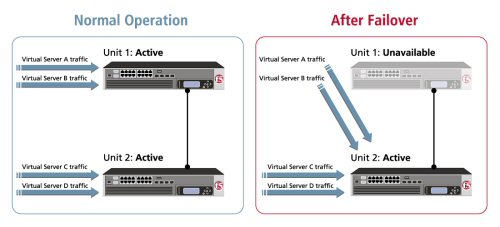
    Active / Active

    Active /Standby

    Benefits of deploying BIG-IP’s in a redundant configuration.

    A key to an effective, resilient and robust network is a good design. Big IP design is a key for faster and more effective failover leading to greater availability and lesser convergence time. This blog is written with the deployment considerations that are done.
    A Big IP works like a switch, having VLAN’s and Spanning Tree Protocol. This enables the Big IP to fit right into your LAN design. You are offered with choices of Active/Standby (Failover) pair or Active/Active or as I like to call it, the “load balance your load balancer” pair, which doubles up on covering for each other. All this is feasible with the concept of “Floating IP”, “Gratuitous ARP” or “Mac Masquerading”.

  • Objective 2.05 Explain the purpose and use cases for full proxy and packet forwarding / packet based architectures

    A. Describe a full proxy architecture.

    The Full-Proxy Data Center Architecture by Lori MacVittie

    Why a full-proxy architecture is important to both infrastructure and data centers.
    In the early days of load balancing and application delivery there was a lot of confusion about proxy-based architectures and in particular the definition of a full-proxy architecture. Understanding what a full-proxy is will be increasingly important as we continue to re-architect the data center to support a more mobile, virtualized infrastructure in the quest to realize IT as a Service.

    THE FULL-PROXY PLATFORM

    The reason there is a distinction made between “proxy” and “full-proxy” stems from the handling of connections as they flow through the device. All proxies sit between two entities – in the Internet age almost always “client” and “server” – and mediate connections. While all full-proxies are proxies, the converse is not true. Not all proxies are full-proxies and it is this distinction that needs to be made when making decisions that will impact the data center architecture.

    A full-proxy maintains two separate session tables – one on the client-side, one on the server-side. There is effectively an “air gap” isolation layer between the two internal to the proxy, one that enables focused profiles to be applied specifically to address issues peculiar to each “side” of the proxy. Clients often experience higher latency because of lower bandwidth connections while the servers are generally low latency because they’re connected via a high-speed LAN. The optimizations and acceleration techniques used on the client side are far different than those on the LAN side because the issues that give rise to performance and availability challenges are vastly different.

     
    A full-proxy, with separate connection handling on either side of the “air gap”, can address these challenges. A proxy, which may be a full-proxy but more often than not simply uses a buffer-and-stitch methodology to perform connection management, cannot optimally do so. A typical proxy buffers a connection, often through the TCP handshake process and potentially into the first few packets of application data, but then “stitches” a connection to a given server on the back-end using either layer 4 or layer 7 data, perhaps both. The connection is a single flow from end-to-end and must choose which characteristics of the connection to focus on – client or server – because it cannot simultaneously optimize for both.
    The second advantage of a full-proxy is its ability to perform more tasks on the data being exchanged over the connection as it is flowing through the component. Because specific action must be taken to “match up” the connection as its flowing through the full-proxy, the component can inspect, manipulate, and otherwise modify the data before sending it on its way on the server-side. This is what enables termination of SSL, enforcement of security policies, and performance-related services to be applied on a per-client, per-application basis.
    This capability translates to broader usage in data center architecture by enabling the implementation of an application delivery tier in which operational risk can be addressed through the enforcement of various policies. In effect, we’re created a full-proxy data center architecture in which the application delivery tier as a whole serves as the “full proxy” that mediates between the clients and the applications.


    THE FULL-PROXY DATA CENTER ARCHITECTURE

    A full-proxy data center architecture installs a digital “air gap” between the client and applications by serving as the aggregation (and conversely disaggregation) point for services. Because all communication is funneled through virtualized applications and services at the application delivery tier, it serves as a strategic point of control at which delivery policies addressing operational risk (performance, availability, security) can be enforced.
    A full-proxy data center architecture further has the advantage of isolating end-users from the volatility inherent in highly virtualized and dynamic environments such as cloud computing . It enables solutions such as those used to overcome limitations with virtualization technology, such as those encountered with pod-architectural constraints in VMware View deployments. Traditional access management technologies, for example, are tightly coupled to host names and IP addresses. In a highly virtualized or cloud computing environment, this constraint may spell disaster for either performance or ability to function, or both.  By implementing access management in the application delivery tier – on a full-proxy device – volatility is managed through virtualization of the resources, allowing the application delivery controller to worry about details such as IP address and VLAN segments, freeing the access management solution to concern itself with determining whether this user on this device from that location is allowed to access a given resource.
    Basically, we’re taking the concept of a full-proxy and expanded it outward to the architecture. Inserting an “application delivery tier” allows for an agile, flexible architecture more supportive of the rapid changes today’s IT organizations must deal with.
    Such a tier also provides an effective means to combat modern attacks. Because of its ability to isolate applications, services, and even infrastructure resources, an application delivery tier improves an organizations’ capability to withstand the onslaught of a concerted DDoS attack. The magnitude of difference between the connection capacity of an application delivery controller and most infrastructure (and all servers) gives the entire architecture a higher resiliency in the face of overwhelming connections. This ensures better availability and, when coupled with virtual infrastructure that can scale on-demand when necessary, can also maintain performance levels required by business concerns.
    A full-proxy data center architecture is an invaluable asset to IT organizations in meeting the challenges of volatility both inside and outside the data center.

    B. Describe a packet forwarding / packet based architecture

    What is a packet-based design?
    A network device with a packet-based (or packet-by-packet) design is located in the middle of a stream of communications, but is not an endpoint for those communications; it just passes the packets through. Often a device that operates on a packet-by-packet basis does have some knowledge of the protocols flowing through it, but is far from being a real protocol endpoint. The speed of these devices is primarily based on not having to understand the entire protocol stack, shortcutting the amount of work needed to handle traffic. For example, with TCP/IP, this type of device might only understand the protocols well enough to rewrite the IP addresses and TCP ports; only about half of the entire stack.

    TMOS: Redefining the Solution

  • Objective 2.04 Explain the purpose, use, and advantages of iControl.

    A. Explain the purpose of iControl


    As iRules is to network traffic, iControl is to F5 configurations. iControl is our open, web services based API that allows complete, dynamic, programmatic control of F5 configuration objects. This means you can add, modify or remove bits from your F5 device on the fly, automatically. Whether you’re looking to add a list of Virtual Servers, shut down half of the 400 members in a pool for an upgrade, or track more advanced stats by writing a script to poll certain data.; the uses for iControl are near limitless.

    B. Explain the use of iControl

    iControl allows an amazing level of fine grained control and access has proven useful time and time again, as many of our users have come to truly rely on the API for automating management tasks in the large scale environments in which BIG-IP is often deployed. Some even use it to design custom interfaces for particular groups of users, or to integrate directly with an existing portal to allow their applications to tie straight into F5 technology.

    iControl Dev Central

  • Objective 2.03 Explain the purpose, use, and advantages of iApps.

    A. Explain the purpose of iApps

    F5 iApps is a powerful set of features in the BIG-IP system that provides 
a new way to architect application delivery in the data center. It gives you a holistic, application-centric view of how applications are managed and delivered inside, outside, and beyond the data center.
    By managing application services rather than the individual networking components and configurations, you can dramatically speed up deployment, lower OpEx, and streamline IT operations. You can provision application services in minutes rather than weeks, significantly improving time-to-market and creating a highly efficient and predictable process for successful application delivery.

    B. Explain the Advantages of iApps

    iApps provides a framework that application, security, network, systems, and operations personnel can use to unify, simplify, and control the entire Application Delivery Network (ADN). You gain a contextual view and advanced statistics about the application services supporting the business. iApps abstracts the many individual components required to
 deliver an application by grouping these resources together in templates associated with applications. This alleviates the need to manage discrete components on the network.

  • Objective 2.02 Explain the purpose use and advantages of iRules

    A. Explain the purpose of iRules

    F5 iRules is a flexible, programmatic interface that makes it possible to extend and customize the functionality of the BIG-IP system. As an event-driven scripting language, iRules gives you the ability to architect application delivery solutions that improve the security, resiliency, and scale of applications in the data center.

    B. Explain the Advantages of iRules

    iRules provides unprecedented control to directly manipulate and manage any IP application traffic using an easy-to-learn scripting syntax. A robust and active community at F5 DevCentralprovides a wealth of existing iRules that can be customized to fit your unique application requirements. With free registration on DevCentral, you have access to hundreds of proven iRules that can mitigate threats and extend the capabilities of your application delivery network. 
  • Objective 2.01 Articulate the role of F5 products.

    Explain the purpose use and benefits of:

    APM

    BIG-IP Access Policy Manager (APM) is a flexible, high-performance access and security solution that provides unified global access to your applications and network. By converging and consolidating remote access, LAN access, and wireless connections within a single management interface, and providing easy-to-manage access policies, BIG-IP APM helps you free up valuable IT resources and scale cost-effectively

    Key benefits

    • Provide unified global access 
    Consolidate remote access, LAN access, and wireless connections in one interface.
    • Consolidate and simplify
    Replace web access proxy tiers and integrate with OAM, XenApp, and Exchange to reduce infrastructure and management costs.
    • Centralize access control 
    Gain a simplified, central point of control to manage access to applications by dynamically enforcing context-aware policies.
    • Ensure superior access and endpoint security 
    Protect your organization from data loss, virus infection, and rogue device access with comprehensive endpoint capabilities.
    • Obtain flexibility, high performance, and scalability 
    Support all of your users easily, quickly, and cost-effectively

    Big IP Access Policy Manager Overview
    Big Ip Access Policy Manager Datasheet
    Configuration Guide for BIG IP Access Policy Manager


    ASM

    F5 BIG-IP® Application Security Manager(ASM) is a flexible web application firewall that secures web applications in traditional, virtual, and private cloud environments. BIG-IP ASM helps secure applications against unknown vulnerabilities, and enables compliance for key regulatory mandates. BIG-IP ASM is a key part of the F5 application delivery firewall solution, which consolidates traffic management, network firewall, application access, DDoS protection, SSL inspection, and DNS security. 

    Key benefits

    • Ensure app security and availability
    Get comprehensive geolocation attack protection from layer 7 distributed denial of service (DDoS), SQL injection, and OWASP Top Ten attacks, and secure the latest interactive AJAX applications and JSON payloads.
    • Reduce costs and enable compliance
    Achieve security standards compliance with built-in application protection.
    • Get out-of-the-box app security policies
    Provide protection with pre-built rapid deployment policies and minimal configuration.
    • Improve app security and performance
    Enable advanced application security while accelerating performance and improving cost effectiveness.
    • Deploy flexibly and incorporate external intelligence
    Focus on fast application development and flexible deployment in virtual and cloud environments while incorporating external intelligence for securing apps against IP threats.


    LTM

    F5® BIG-IP® Local Traffic Manager(LTM) helps you deliver your applications to your users, in a reliable, secure, and optimized way. You get the extensibility and flexibility of an intelligent services framework with the programmability you need to manage your physical, virtual, and cloud infrastructure. With BIG-IP LTM, you have the power to simplify, automate, and customize applications faster and more predictably.

    Key benefits

    • Deliver applications rapidly and reliably
    Ensure that your customers and users have access to the applications they need—whenever they need them.
    • Customize and automate with programmable infrastructure
    Control your applications—from connection and traffic to configuration and management—with
    F5’s unique TMOS. operating system, which includes native protocol support, an openmanagement
    API, and an event-driven scripting language.
    • Transition to SDN and cloud networks
    Realize operational consistency and comply with business needs across physical, virtual, and cloud environments with deployment flexibility and scalability.
    • Easily deploy and manage applications
    User-defined F5 iApps. Templates make it easy to deploy, manage, and get complete visibility into your applications.
    • Secure your critical applications
    Protect the apps that run your business with industry-leading SSL performance and visibility.


    GTM

    F5® BIG-IP® Global Traffic Manager™ (GTM) distributes DNS and user application requests based on business policies, data center and network conditions, user location, and application performance. BIG-IP GTM delivers F5’s high-performance DNS Services with visibility, reporting, and analysis; scales and secures DNS responses geographically to survive DDoS attacks; delivers a complete, real-time DNSSEC solution; and ensures global application high availability.

    Key benefits

    • Scale DNS to more than 10 million RPS with a fully-loaded chassis
    BIG IP GTM dramatically scales DNS to more than 10 million query RPS and controls DNS traffic. It ensures that users are connected to the best site, and delivers On-Demand Scaling for DNS and global apps
    • Gain control and secure global application delivery
    Route users based on business, geolocation, application, and network requirements to gain flexibility and control. Also ensure application availability and protection during DNS DDoS attacks or volume spikes.
    • Improve application performance
    Send users to the site with the best application performance based on application and network conditions. 
    • Deploy flexibly, scale as you grow, and manage your network efficiently
    BIG-IP GTM Virtual Edition (VE) delivers flexible global application management in virtual and cloud environments. Multiple management tools give you complete visibility and control; advanced logging, statistics and reporting; and a single point of control for your DNS and global app delivery resources.


    EM

     F5® Enterprise Manager™ significantly reduces the cost and complexity of managing multiple F5 devices. You gain a single-pane view of your entire application delivery infrastructure and the tools you need to automate common tasks, ensure optimized application performance, and improve budgeting and forecasting to meet changing business needs. Enterprise Manager is available as a physical or virtual edition. 

    Key benefits

    • Ensure optimized performance

    Get an up-to-date, comprehensive view of application traffic and device performance. Set thresholds and alerts to react quickly to changing network conditions and user demands.

    • Reduce TCO through automation

    Use a single interface to automate common operational tasks for your F5 devices, reducing total cost of ownership and OpEx.

    • Improve budgeting and forecasting

    Use 160 customizable metrics to gain complete visibility into your application delivery infrastructure over time and improve planning and budgeting for future projects.

    • Troubleshoot more effectively

    Quickly isolate application performance and traffic management problems to minimize the effect on your business.

    • Gain flexibility

    Deploy according to your business needs with the flexibility of physical and virtual Enterprise Manager editions
    Application-Delivery-Network-Platform-Management-White-Paper


    WA (Web Accelerator) 

    BIG-IP® WebAccelerator™ automates web performance optimization, to instantly improve performance for end users and help you reduce costs. By offloading your network and servers, BIG-IP WebAccelerator decreases your spending on additional bandwidth and hardware. Users get fast access to applications, and you gain greater revenue and free up IT resources for other strategic projects.

    WA Key benefits

    • Improve user experience and revenue 

    Reduce frustration for employees and consumers using your site with fast apps, and pave the way for higher productivity and sales.

    • Deploy according to your business needs

    Improve asymmetric deployment performance by 2x to 5x, and symmetric deployment by up to 10x. 

    • Reduce costs

    Reduce the number of application servers required with SSL offload, compression offload, and caching—and save both CapEx and OpEx.

    • Optimize server and bandwidth usage

    Extend server capacity and reduce bandwidth usage to improve performance and reduce costs.

    • Simplify deployment and management

    Use pre-defined policies for apps such as SharePoint, SAP Portal, Oracle Portal, E-business Suite 11/12, Siebel CRM, and more to simplify configuration.

    • Boost performance of mobile apps

    Apply front-end optimization techniques to overcome the unique app delivery challenges of mobile devices.
    Big-Ip-Webaccelerator-Overview
    Big-Ip-Webaccelerator-Data-Sheet
    Configuration-Guide-for-the-BIG-IP-WebAccelerator-System
    Policy-Management-Guide-for-the-BIG-IP-WebAccelerator-System


    WOM (Wan Optimization)

    F5® BIG-IP® WAN Optimization Module™ (WOM) compresses, deduplicates, and encrypts data between two data centers. When used in conjunction with Oracle Data Guard, BIG-IP WOM improves the performance of replication while enabling the secure transfer of data within your database management system (DBMS). The more latency, congestion, and packet loss your connection suffers from, the more BIG-IP WOM improves your replication environment.

    Key features

    • TCP Optimization—Cut down on the overhead inherent in TCP to speed replication
    • Rate Shaping—Set limits for how much and how little bandwidth Data Guard should receive
    • Compression—Send compressed versions of data over the WAN to reduce bandwidth
    • Deduplication—Send each distinct bit of data only once with advanced deduplication technology

    Key benefits

    • Increase Performance—Improve RPOs and RTOs by reducing data replication lag
    • Increase Efficiency—Maximize bandwidth utilization
    • Cost Savings—Reduce WAN costs and offload CPU-intensive processes from servers
    • Improve Security—Encrypt SQL transactions over the WAN

    Oracle-Data-Guard-Wom-Solution-Profile

    ARX

    F5 ARX intelligent file virtualization simplifies how your file data is accessed, moved, and managed. Data management policies help you match the business value of your data to the cost of its storage. Smart storage tiering moves your files automatically and without disruption or downtime, while dynamic capacity balancing improves overall utilization of your existing storage resources. ARX is available in a range of hardware devices and as a virtual edition.

    Key benefits
    • Reduce storage costs
    Match the business value of your data to the cost of its storage; reduce costs with new technologies.
    • Optimize backups
    Decrease the backup of redundant data to lower backup and recovery times, media consumption, and costs.
    • Maximize value of existing storage
    Improve utilization, reclaim stranded capacity, and defer additional storage purchases.
    • Simplify management
    Perform storage provisioning and decommissioning without disrupting users.
    • Improve flexibility and choice
    Move your data wherever and whenever you want, even between heterogeneous devices.
  • Objective 1.05 Explain the features and functionality of protocols and technologies specific to the application layer

    A. Explain the purpose and functionality of HTTP

    The Hypertext Transfer Protocol (HTTP) is an application protocol for distributed, collaborative, hypermedia information systems.[1] HTTP is the foundation of data communication for the World Wide Web.
    Hypertext is structured text that uses logical links (hyperlinks) between nodes containing text. HTTP is the protocol to exchange or transfer hypertext.
    The standards development of HTTP was coordinated by the Internet Engineering Task Force (IETF) and the World Wide Web Consortium (W3C), culminating in the publication of a series of Requests for Comments (RFCs), most notably RFC 2616 (June 1999), which defines HTTP/1.1, the version of HTTP in common use.
    HTTP functions as a request-response protocol in the client-server computing model. A web browser, for example, may be the client and an application running on a computer hosting a web site may be the server. The client submits an HTTP request message to the server. The server, which provides resources such asHTML files and other content, or performs other functions on behalf of the client, returns a response message to the client. The response contains completion status information about the request and may also contain requested content in its message body.
    A web browser is an example of a user agent (UA). Other types of user agent include the indexing software used by search providers (web crawlers), voice browsersmobile apps and other software that accesses, consumes or displays web content.
    HTTP is designed to permit intermediate network elements to improve or enable communications between clients and servers. High-traffic websites often benefit from web cache servers that deliver content on behalf of upstream servers to improve response time. Web browsers cache previously accessed web resources and reuse them when possible to reduce network traffic. HTTP proxy servers at private network boundaries can facilitate communication for clients without a globally routable address, by relaying messages with external servers.
    HTTP is an application layer protocol designed within the framework of the Internet Protocol Suite. Its definition presumes an underlying and reliable transport layerprotocol,[2] and Transmission Control Protocol (TCP) is commonly used. However HTTP can use unreliable protocols such as the User Datagram Protocol (UDP), for example in Simple Service Discovery Protocol (SSDP).
    HTTP resources are identified and located on the network by Uniform Resource Identifiers (URIs)—or, more specifically, Uniform Resource Locators (URLs)—using the http or https URI schemes. URIs and hyperlinks in Hypertext Markup Language (HTML) documents form webs of inter-linked hypertext documents.

    B. Differentiate between HTTP versions

    HTTP/1.1 is a revision of the original HTTP (HTTP/1.0). In HTTP/1.0 a separate connection to the same server is made for every resource request. HTTP/1.1 can reuse a connection multiple times to download images, scripts, stylesheets et cetera after the page has been delivered. HTTP/1.1 communications therefore experience less latency as the establishment of TCP connections presents considerable overhead.

    Goals for HTTP 2.0 include asynchronous connection multiplexing, header compression, and request-response pipelining, while maintaining full backwards compatibility with the transaction semantics of HTTP 1.1. It comes as an answer to the rise of SPDY, an HTTP compatible protocol launched by Google[2] and supported in ChromeOperaFirefox, and Amazon Silk browsers,[3] as well as the pressure from alternative protocols like WebSocket.
    The httpbis working group considered Google’s SPDY protocol, Microsoft‘s HTTP Speed+Mobility proposal (SPDY based),[4] and Network-Friendly HTTP Upgrade.[5] In July 2012 Facebook provided feedback on each of the proposals and recommended HTTP 2.0 be based on SPDY.[6] The initial draft of HTTP 2.0 was published in November 2012 and is based on a straight copy of SPDY.[7]
    Many of the architectural approaches in these protocols were explored earlier by the World Wide Web Consortium‘s HTTP-NG working group. Work on the HTTP-NG project was suspended in 1998.[8]

    C. Interpret HTTP status codes

    In HTTP/1.0 and since, the first line of the HTTP response is called the status line and includes a numeric status code (such as “404“) and a textual reason phrase (such as “Not Found”). The way the user agent handles the response primarily depends on the code and secondarily on the response headers. Custom status codes can be used since, if the user agent encounters a code it does not recognize, it can use the first digit of the code to determine the general class of the response.[20]
    Also, the standard reason phrases are only recommendations and can be replaced with “local equivalents” at the web developer‘s discretion. If the status code indicated a problem, the user agent might display the reason phrase to the user to provide further information about the nature of the problem. The standard also allows the user agent to attempt to interpret the reason phrase, though this might be unwise since the standard explicitly specifies that status codes are machine-readable and reason phrases are human-readable.

    1xx Informational[edit|edit source]

    Request received, continuing process.[2]
    This class of status code indicates a provisional response, consisting only of the Status-Line and optional headers, and is terminated by an empty line. Since HTTP/1.0 did not define any 1xx status codes, servers must not send a 1xx response to an HTTP/1.0 client except under experimental conditions.
    100 Continue
    This means that the server has received the request headers, and that the client should proceed to send the request body (in the case of a request for which a body needs to be sent; for example, aPOST request). If the request body is large, sending it to a server when a request has already been rejected based upon inappropriate headers is inefficient. To have a server check if the request could be accepted based on the request’s headers alone, a client must send Expect: 100-continue as a header in its initial request[2] and check if a 100 Continue status code is received in response before continuing (or receive 417 Expectation Failed and not continue).[2]
    101 Switching Protocols
    This means the requester has asked the server to switch protocols and the server is acknowledging that it will do so.[2]
    102 Processing (WebDAV; RFC 2518)
    As a WebDAV request may contain many sub-requests involving file operations, it may take a long time to complete the request. This code indicates that the server has received and is processing the request, but no response is available yet.[3] This prevents the client from timing out and assuming the request was lost.

    2xx Success[edit]

    This class of status codes indicates the action requested by the client was received, understood, accepted and processed successfully.
    200 OK
    Standard response for successful HTTP requests. The actual response will depend on the request method used. In a GET request, the response will contain an entity corresponding to the requested resource. In a POST request the response will contain an entity describing or containing the result of the action.[2]
    201 Created
    The request has been fulfilled and resulted in a new resource being created.[2]
    202 Accepted
    The request has been accepted for processing, but the processing has not been completed. The request might or might not eventually be acted upon, as it might be disallowed when processing actually takes place.[2]
    203 Non-Authoritative Information (since HTTP/1.1)
    The server successfully processed the request, but is returning information that may be from another source.[2]
    204 No Content
    The server successfully processed the request, but is not returning any content.[2] Usually used as a response to a successful delete request.
    205 Reset Content
    The server successfully processed the request, but is not returning any content. Unlike a 204 response, this response requires that the requester reset the document view.[2]
    206 Partial Content
    The server is delivering only part of the resource due to a range header sent by the client. The range header is used by tools like wget to enable resuming of interrupted downloads, or split a download into multiple simultaneous streams.[2]
    207 Multi-Status (WebDAV; RFC 4918)
    The message body that follows is an XML message and can contain a number of separate response codes, depending on how many sub-requests were made.[4]
    208 Already Reported (WebDAV; RFC 5842)
    The members of a DAV binding have already been enumerated in a previous reply to this request, and are not being included again.
    226 IM Used (RFC 3229)
    The server has fulfilled a GET request for the resource, and the response is a representation of the result of one or more instance-manipulations applied to the current instance.[5]

    3xx Redirection[edit]

    The client must take additional action to complete the request.[2]
    This class of status code indicates that further action needs to be taken by the user agent to fulfil the request. The action required may be carried out by the user agent without interaction with the user if and only if the method used in the second request is GET or HEAD. A user agent should not automatically redirect a request more than five times, since such redirections usually indicate an infinite loop.
    300 Multiple Choices
    Indicates multiple options for the resource that the client may follow. It, for instance, could be used to present different format options for video, list files with different extensions, or word sense disambiguation.[2]
    301 Moved Permanently
    This and all future requests should be directed to the given URI.[2]
    302 Found
    This is an example of industry practice contradicting the standard.[2] The HTTP/1.0 specification (RFC 1945) required the client to perform a temporary redirect (the original describing phrase was “Moved Temporarily”),[6] but popular browsers implemented 302 with the functionality of a 303 See Other. Therefore, HTTP/1.1 added status codes 303 and 307 to distinguish between the two behaviours.[7]However, some Web applications and frameworks use the 302 status code as if it were the 303.[8]
    303 See Other (since HTTP/1.1)
    The response to the request can be found under another URI using a GET method. When received in response to a POST (or PUT/DELETE), it should be assumed that the server has received the data and the redirect should be issued with a separate GET message.[2]
    304 Not Modified
    Indicates that the resource has not been modified since the version specified by the request headers If-Modified-Since or If-Match.[2] This means that there is no need to retransmit the resource, since the client still has a previously-downloaded copy.
    305 Use Proxy (since HTTP/1.1)
    The requested resource is only available through a proxy, whose address is provided in the response.[2] Many HTTP clients (such as Mozilla[9] and Internet Explorer) do not correctly handle responses with this status code, primarily for security reasons.[citation needed]
    306 Switch Proxy
    No longer used.[2] Originally meant “Subsequent requests should use the specified proxy.”[10]
    307 Temporary Redirect (since HTTP/1.1)
    In this case, the request should be repeated with another URI; however, future requests should still use the original URI.[2] In contrast to how 302 was historically implemented, the request method is not allowed to be changed when reissuing the original request. For instance, a POST request should be repeated using another POST request.[11]
    308 Permanent Redirect (approved as experimental RFC)[12]
    The request, and all future requests should be repeated using another URI. 307 and 308 (as proposed) parallel the behaviours of 302 and 301, but do not allow the HTTP method to change. So, for example, submitting a form to a permanently redirected resource may continue smoothly.

    4xx Client Error[edit]

    The 4xx class of status code is intended for cases in which the client seems to have erred. Except when responding to a HEAD request, the server should include an entity containing an explanation of the error situation, and whether it is a temporary or permanent condition. These status codes are applicable to any request method. User agents should display any included entity to the user.
    400 Bad Request
    The request cannot be fulfilled due to bad syntax.[2]
    401 Unauthorized
    Similar to 403 Forbidden, but specifically for use when authentication is required and has failed or has not yet been provided.[2] The response must include a WWW-Authenticate header field containing a challenge applicable to the requested resource. See Basic access authentication and Digest access authentication.
    402 Payment Required
    Reserved for future use.[2] The original intention was that this code might be used as part of some form of digital cash or micropayment scheme, but that has not happened, and this code is not usually used. As an example of its use, however, Apple’s defunct MobileMe service generated a 402 error if the MobileMe account was delinquent.[citation needed] In addition, YouTube uses this status if a particular IP address has made excessive requests, and requires the person to enter a CAPTCHA.
    403 Forbidden
    The request was a valid request, but the server is refusing to respond to it.[2] Unlike a 401 Unauthorized response, authenticating will make no difference.[2] On servers where authentication is required, this commonly means that the provided credentials were successfully authenticated but that the credentials still do not grant the client permission to access the resource (e.g. a recognized user attempting to access restricted content).
    404 Not Found
    The requested resource could not be found but may be available again in the future.[2] Subsequent requests by the client are permissible.
    405 Method Not Allowed
    A request was made of a resource using a request method not supported by that resource;[2] for example, using GET on a form which requires data to be presented via POST, or using PUT on a read-only resource.
    406 Not Acceptable
    The requested resource is only capable of generating content not acceptable according to the Accept headers sent in the request.[2]
    407 Proxy Authentication Required
    The client must first authenticate itself with the proxy.[2]
    408 Request Timeout
    The server timed out waiting for the request.[2] According to W3 HTTP specifications: “The client did not produce a request within the time that the server was prepared to wait. The client MAY repeat the request without modifications at any later time.”
    409 Conflict
    Indicates that the request could not be processed because of conflict in the request, such as an edit conflict in the case of multiple updates.[2]
    410 Gone
    Indicates that the resource requested is no longer available and will not be available again.[2] This should be used when a resource has been intentionally removed and the resource should be purged. Upon receiving a 410 status code, the client should not request the resource again in the future. Clients such as search engines should remove the resource from their indices. Most use cases do not require clients and search engines to purge the resource, and a “404 Not Found” may be used instead.
    411 Length Required
    The request did not specify the length of its content, which is required by the requested resource.[2]
    412 Precondition Failed
    The server does not meet one of the preconditions that the requester put on the request.[2]
    413 Request Entity Too Large
    The request is larger than the server is willing or able to process.[2]
    414 Request-URI Too Long
    The URI provided was too long for the server to process.[2] Often the result of too much data being encoded as a query-string of a GET request, in which case it should be converted to a POST request.
    415 Unsupported Media Type
    The request entity has a media type which the server or resource does not support.[2] For example, the client uploads an image as image/svg+xml, but the server requires that images use a different format.
    416 Requested Range Not Satisfiable
    The client has asked for a portion of the file, but the server cannot supply that portion.[2] For example, if the client asked for a part of the file that lies beyond the end of the file.[2]
    417 Expectation Failed
    The server cannot meet the requirements of the Expect request-header field.[2]
    418 I’m a teapot (RFC 2324)
    This code was defined in 1998 as one of the traditional IETF April Fools’ jokes, in RFC 2324Hyper Text Coffee Pot Control Protocol, and is not expected to be implemented by actual HTTP servers.
    419 Authentication Timeout (not in RFC 2616)
    Not a part of the HTTP standard, 419 Authentication Timeout denotes that previously valid authentication has expired. It is used as an alternative to 401 Unauthorized in order to differentiate from otherwise authenticated clients being denied access to specific server resources.
    420 Enhance Your Calm (Twitter)
    Not part of the HTTP standard, but returned by the Twitter Search and Trends API when the client is being rate limited.[13] Other services may wish to implement the 429 Too Many Requests response code instead.
    422 Unprocessable Entity (WebDAV; RFC 4918)
    The request was well-formed but was unable to be followed due to semantic errors.[4]
    423 Locked (WebDAV; RFC 4918)
    The resource that is being accessed is locked.[4]
    424 Failed Dependency (WebDAV; RFC 4918)
    The request failed due to failure of a previous request (e.g. a PROPPATCH).[4]
    424 Method Failure (WebDAV)[14]
    Indicates the method was not executed on a particular resource within its scope because some part of the method’s execution failed causing the entire method to be aborted.
    425 Unordered Collection (Internet draft)
    Defined in drafts of “WebDAV Advanced Collections Protocol”,[15] but not present in “Web Distributed Authoring and Versioning (WebDAV) Ordered Collections Protocol”.[16]
    426 Upgrade Required (RFC 2817)
    The client should switch to a different protocol such as TLS/1.0.[17]
    428 Precondition Required (RFC 6585)
    The origin server requires the request to be conditional. Intended to prevent “the ‘lost update’ problem, where a client GETs a resource’s state, modifies it, and PUTs it back to the server, when meanwhile a third party has modified the state on the server, leading to a conflict.”[18]
    429 Too Many Requests (RFC 6585)
    The user has sent too many requests in a given amount of time. Intended for use with rate limiting schemes.[18]
    431 Request Header Fields Too Large (RFC 6585)
    The server is unwilling to process the request because either an individual header field, or all the header fields collectively, are too large.[18]
    444 No Response (Nginx)
    Used in Nginx logs to indicate that the server has returned no information to the client and closed the connection (useful as a deterrent for malware).
    449 Retry With (Microsoft)
    A Microsoft extension. The request should be retried after performing the appropriate action.[19]
    Often search-engines or custom applications will ignore required parameters. Where no default action is appropriate, the Aviongoo website sends a “HTTP/1.1 449 Retry with valid parameters: param1, param2, . . .” response. The applications may choose to learn, or not.
    450 Blocked by Windows Parental Controls (Microsoft)
    A Microsoft extension. This error is given when Windows Parental Controls are turned on and are blocking access to the given webpage.[20]
    451 Unavailable For Legal Reasons (Internet draft)
    Defined in the internet draft “A New HTTP Status Code for Legally-restricted Resources”.[21] Intended to be used when resource access is denied for legal reasons, e.g. censorship or government-mandated blocked access. A reference to the 1953 dystopian novel Fahrenheit 451, where books are outlawed.[22]
    451 Redirect (Microsoft)
    Used in Exchange ActiveSync if there either is a more efficient server to use or the server can’t access the users’ mailbox.[23]
    The client is supposed to re-run the HTTP Autodiscovery protocol to find a better suited server.[24]
    494 Request Header Too Large (Nginx)
    Nginx internal code similar to 413 but it was introduced earlier.[25][original research?]
    495 Cert Error (Nginx)
    Nginx internal code used when SSL client certificate error occurred to distinguish it from 4XX in a log and an error page redirection.
    496 No Cert (Nginx)
    Nginx internal code used when client didn’t provide certificate to distinguish it from 4XX in a log and an error page redirection.
    497 HTTP to HTTPS (Nginx)
    Nginx internal code used for the plain HTTP requests that are sent to HTTPS port to distinguish it from 4XX in a log and an error page redirection.
    499 Client Closed Request (Nginx)
    Used in Nginx logs to indicate when the connection has been closed by client while the server is still processing its request, making server unable to send a status code back.[26]

    5xx Server Error[edit]

    The server failed to fulfill an apparently valid request.[2]
    Response status codes beginning with the digit “5” indicate cases in which the server is aware that it has encountered an error or is otherwise incapable of performing the request. Except when responding to a HEAD request, the server should include an entity containing an explanation of the error situation, and indicate whether it is a temporary or permanent condition. Likewise, user agents should display any included entity to the user. These response codes are applicable to any request method.
    500 Internal Server Error
    A generic error message, given when no more specific message is suitable.[2]
    501 Not Implemented
    The server either does not recognize the request method, or it lacks the ability to fulfill the request.[2] Usually this implies future availability (eg. a new feature of a web-service API).
    502 Bad Gateway
    The server was acting as a gateway or proxy and received an invalid response from the upstream server.[2]
    503 Service Unavailable
    The server is currently unavailable (because it is overloaded or down for maintenance).[2] Generally, this is a temporary state.
    504 Gateway Timeout
    The server was acting as a gateway or proxy and did not receive a timely response from the upstream server.[2]
    505 HTTP Version Not Supported
    The server does not support the HTTP protocol version used in the request.[2]
    506 Variant Also Negotiates (RFC 2295)
    Transparent content negotiation for the request results in a circular reference.[27]
    507 Insufficient Storage (WebDAV; RFC 4918)
    The server is unable to store the representation needed to complete the request.[4]
    508 Loop Detected (WebDAV; RFC 5842)
    The server detected an infinite loop while processing the request (sent in lieu of 208).
    509 Bandwidth Limit Exceeded (Apache bw/limited extension)
    This status code, while used by many servers, is not specified in any RFCs.
    510 Not Extended (RFC 2774)
    Further extensions to the request are required for the server to fulfil it.[28]
    511 Network Authentication Required (RFC 6585)
    The client needs to authenticate to gain network access. Intended for use by intercepting proxies used to control access to the network (e.g. “captive portals” used to require agreement to Terms of Service before granting full Internet access via a Wi-Fi hotspot).[18]
    598 Network read timeout error (Unknown)
    This status code is not specified in any RFCs, but is used by Microsoft HTTP proxies to signal a network read timeout behind the proxy to a client in front of the proxy.[citation needed]
    599 Network connect timeout error (Unknown)
    This status code is not specified in any RFCs, but is used by Microsoft HTTP proxies to signal a network connect timeout behind the proxy to a client in front of the proxy.

    D. Determine an HTTP request method for a given use case

    HTTP defines methods (sometimes referred to as verbs) to indicate the desired action to be performed on the identified resource. What this resource represents, whether pre-existing data or data that is generated dynamically, depends on the implementation of the server. Often, the resource corresponds to a file or the output of an executable residing on the server.
    The HTTP/1.0 specification[10]:section 8 defined the GET, POST and HEAD methods and the HTTP/1.1 specification[1]:section 9 added 5 new methods: OPTIONS, PUT, DELETE, TRACE and CONNECT. By being specified in these documents their semantics are well known and can be depended upon. Any client can use any method and the server can be configured to support any combination of methods. If a method is unknown to an intermediate it will be treated as an unsafe and non-idempotent method. There is no limit to the number of methods that can be defined and this allows for future methods to be specified without breaking existing infrastructure. For example WebDAV defined 7 new methods and RFC5789 specified the PATCH method.
    GET
    Requests a representation of the specified resource. Requests using GET should only retrieve data and should have no other effect. (This is also true of some other HTTP methods.)[1] The W3C has published guidance principles on this distinction, saying, “Web application design should be informed by the above principles, but also by the relevant limitations.”[11] See safe methods below.
    HEAD
    Asks for the response identical to the one that would correspond to a GET request, but without the response body. This is useful for retrieving meta-information written in response headers, without having to transport the entire content.
    POST 
    Requests that the server accept the entity enclosed in the request as a new subordinate of the web resource identified by the URI. The data POSTed might be, as examples, an annotation for existing resources; a message for a bulletin board, newsgroup, mailing list, or comment thread; a block of data that is the result of submitting a web form to a data-handling process; or an item to add to a database.[12]
    PUT
    Requests that the enclosed entity be stored under the supplied URI. If the URI refers to an already existing resource, it is modified; if the URI does not point to an existing resource, then the server can create the resource with that URI.[13]
    DELETE
    Deletes the specified resource.
    TRACE
    Echoes back the received request so that a client can see what (if any) changes or additions have been made by intermediate servers.
    OPTIONS
    Returns the HTTP methods that the server supports for specified URL. This can be used to check the functionality of a web server by requesting ‘*’ instead of a specific resource.
    CONNECT
    Converts the request connection to a transparent TCP/IP tunnel, usually to facilitate SSL-encrypted communication (HTTPS) through an unencrypted HTTP proxy.[14][15]
    PATCH
    Is used to apply partial modifications to a resource.[16]
    HTTP servers are required to implement at least the GET and HEAD methods[17] and, whenever possible, also the OPTIONS method.

    E. Explain the purpose and functionality of HTTP keepalives

    Persistent connections[edit]

    In HTTP/0.9 and 1.0, the connection is closed after a single request/response pair. In HTTP/1.1 a keep-alive-mechanism was introduced, where a connection could be reused for more than one request. Such persistent connections reduce request latency perceptibly, because the client does not need to re-negotiate the TCP connection after the first request has been sent. Another positive side effect is that in general the connection becomes faster with time due to TCP’s slow-start-mechanism.
    Version 1.1 of the protocol also made bandwidth optimization improvements to HTTP/1.0. For example, HTTP/1.1 introduced chunked transfer encoding to allow content on persistent connections to be streamed rather than buffered. HTTP pipelining further reduces lag time, allowing clients to send multiple requests before waiting for each response. Another improvement to the protocol was byte serving, where a server transmits just the portion of a resource explicitly requested by a client.

    HTTP session state[edit]

    HTTP is a stateless protocol. A stateless protocol does not require the HTTP server to retain information or status about each user for the duration of multiple requests. However, some web applicationsimplement states or server side sessions using one or more of the following methods:


    F. Explain the purpose and functionality of HTTP headers

    HTTP header fields are components of the message header of requests and responses in the Hypertext Transfer Protocol (HTTP). They define the operating parameters of an HTTP transaction. The header fields are transmitted after the request or response line, which is the first line of a message. Header fields are colon-separated name-value pairs in clear-text string format, terminated by a carriage return (CR) and line feed (LF) character sequence. The end of the header fields is indicated by an empty field, resulting in the transmission of two consecutive CR-LF pairs. Long lines can be folded into multiple lines; continuation lines are indicated by the presence of a space (SP) or horizontal tab (HT) as the first character on the next line.

    G. Explain the purpose and functionality of DNS

    The Domain Name System (DNS) is a hierarchical distributed naming system for computers, services, or any resource connected to the Internet or a private network. It associates various information with domain names assigned to each of the participating entities. Most prominently, it translates easily memorizeddomain names to the numerical IP addresses needed for the purpose of locating computer services and devices worldwide. By providing a worldwide, distributedkeyword-based redirection service, the Domain Name System is an essential component of the functionality of the Internet.

    H. Explain the purpose and functionality of SIP

    The Session Initiation Protocol (SIP) is a signaling communications protocol, widely used for controlling multimedia communication sessions such as voiceand video calls over Internet Protocol (IP) networks.
    The protocol defines the messages that are sent between peers which govern establishment, termination and other essential elements of a call. SIP can be used for creating, modifying and terminating two-party (unicast) or multiparty (multicastsessions consisting of one or several media streams. Other SIP applications include video conferencing, streaming multimedia distribution, instant messagingpresence informationfile transferfax over IP and online games.
    Originally designed by Henning Schulzrinne and Mark Handley in 1996, SIP has been developed and standardized in RFC 3261 under the auspices of theInternet Engineering Task Force (IETF). It is an application layer protocol designed to be independent of the underlying transport layer; it can run on Transmission Control Protocol (TCP), User Datagram Protocol (UDP) or Stream Control Transmission Protocol (SCTP).[1] It is a text-based protocol, incorporating many elements of the Hypertext Transfer Protocol (HTTP) and the Simple Mail Transfer Protocol (SMTP).[2]
    SIP works in conjunction with several other application layer protocols that identify and carry the session media. Media identification and negotiation is achieved with the Session Description Protocol (SDP). For the transmission of media streams (voice, video) SIP typically employs the Real-time Transport Protocol (RTP), which may be secured with the Secure Real-time Transport Protocol (SRTP). For secure transmissions of SIP messages the protocol may be encrypted withTransport Layer Security (TLS).

    I. Explain the purpose and functionality of FTP

    File Transfer Protocol (FTP) is a standard network protocol used to transfer files from one host to another host over a TCP-based network, such as the Internet.
    FTP is built on a client-server architecture and uses separate control and data connections between the client and the server.[1] FTP users may authenticate themselves using a clear-text sign-in protocol, normally in the form of a username and password, but can connect anonymously if the server is configured to allow it. For secure transmission that hides (encrypts) the username and password, and encrypts the content, FTP is often secured with SSL/TLS (“FTPS”). SSH File Transfer Protocol (“SFTP”) is sometimes also used instead, but is technologically different.
    The first FTP client applications were command-line applications developed before operating systems had graphical user interfaces, and are still shipped with most WindowsUnix, and Linux operating systems.[2][3] Dozens of FTP clients and automation utilities have since been developed for desktops, servers, mobile devices, and hardware, and FTP has been incorporated into hundreds of productivity applications, such as Web page editors.

    J. Differentiate between passive and active FTP

    FTP may run in active or passive mode, which determines how the data connection is established. In active mode, the client creates a TCP control connection. In situations where the client is behind a firewall and unable to accept incoming TCP connections, passive mode may be used. In this mode, the client uses the control connection to send a PASV command to the server and then receives a server IP address and server port number from the server, which the client then uses to open a data connection from an arbitrary client port to the server IP address and server port number received. Both modes were updated in September 1998 to support IPv6. Further changes were introduced to the passive mode at that time, updating it to extended passive mode.
    K. Explain the purpose and functionality of SMTP

    Simple Mail Transfer Protocol (SMTP) is an Internet standard for electronic mail (e-mail) transmission across Internet Protocol (IP) networks. SMTP was first defined by RFC 821 (1982, eventually declared STD 10),[1] and last updated by RFC 5321 (2008)[2] which includes the Extended SMTP (ESMTP) additions, and is the protocol in widespread use today.
    SMTP uses TCP port 25. The protocol for new submissions (MSA) is effectively the same as SMTP, but it uses port 587 instead. SMTP connections secured bySSL are known by the shorthand SMTPS, though SMTPS is not a protocol in its own right.
    While electronic mail servers and other mail transfer agents use SMTP to send and receive mail messages, user-level client mail applications typically use SMTP only for sending messages to a mail server for relaying. For receiving messages, client applications usually use either the Post Office Protocol (POP) or the Internet Message Access Protocol (IMAP) or a proprietary system (such as Microsoft Exchange or Lotus Notes/Domino) to access their mail box accounts on a mail server.

    L. Explain the purpose and functionality of a cookie

    cookie, also known as an HTTP cookieweb cookie, or browser cookie, is a small piece of data sent from a website and stored in a user’s web browserwhile a user is browsing a website. When the user browses the same website in the future, the data stored in the cookie is sent back to the website by the browser to notify the website of the user’s previous activity.[1] Cookies were designed to be a reliable mechanism for websites to remember the state of the website or activity the user had taken in the past. This can include clicking particular buttons, logging in, or a record of which pages were visited by the user even months or years ago.
    Although cookies cannot carry viruses, and cannot install malware on the host computer,[2] tracking cookies and especially third-party tracking cookies are commonly used as ways to compile long-term records of individuals’ browsing histories—a potential privacy concern that prompted European and US law makers to take action in 2011.[3][4] Cookies can also store passwords and forms a user has previously entered, such as a credit card number or an address. When a user accesses a website with a cookie function for the first time, a cookie is sent from server to the browser and stored with the browser in the local computer. Later when that user goes back to the same website, the website will recognize the user because of the stored cookie with the user’s information.[5]
    Other kinds of cookies perform essential functions in the modern web. Perhaps most importantly, authentication cookies are the most common method used by web servers to know whether the user is logged in or not, and which account they are logged in under. Without such a mechanism, the site would not know whether to send a page containing sensitive information, or require the user to authenticate himself by logging in. The security of an authentication cookie generally depends on the security of the issuing website and the user’s web browser, and on whether the cookie data is encrypted. Security vulnerabilities may allow a cookie’s data to be read by a hacker, used to gain access to user data, or used to gain access (with the user’s credentials) to the website to which the cookie belongs (see cross-site scripting and cross-site request forgery for examples).

    M. Given a situation in which a client connects to a remote host, explain how the name resolution process occurs

    DNS Name Resolution Process 

    Resolution Process Steps
    Now, suppose you are an employee within XYZ Industries and one of your clients is in charge of the networking department at Googleplex U. You type into your Web browser the address of this department’s Web server, “www.net.compsci.googleplex.edu”. In simplified terms, the procedure would involve the following set of steps (Figure 245 shows the process graphically):
    1. Your Web browser recognizes the request for a name and invokes your local resolver, passing to it the name “www.net.compsci.googleplex.edu”.
    2. The resolver checks its cache to see if it already has the address for this name. If it does, it returns it immediately to the Web browser, but in this case we are assuming that it does not. The resolver also checks to see if it has a local host table file. If so, it scans the file to see if this name has a static mapping. If so, it resolves the name using this information immediately. Again, let’s assume it does not, since that would be boring.
    3. The resolver generates a recursive query and sends it to “ns1.xyzindustries.com” (using that server’s IP address, of course, which the resolver knows).
    4. The local DNS server receives the request and checks its cache. Again, let’s assume it doesn’t have the information needed. If it did, it would return the information, marked “non-authoritative”, to the resolver. The server also checks to see if it has in its zone resource records that can resolve “www.net.compsci.googleplex.edu”. Of course it does not, in this case, since they are in totally different domains.
    5. “ns1.xyzindustries.com” generates an iterative request for the name and sends it to a root name server.
    6. The root name server does not resolve the name. It returns the name and address of the name server for the “.edu” domain. 
    7. “ns1.xyzindustries.com” generates an iterative request and sends it to the name server for “.edu”.
    8. The name server for “.edu” returns the name and address of the name server for the “googleplex.edu” domain.
    9. “ns1.xyzindustries.com” generates an iterative request and sends it to the name server for “googleplex.edu”.
    10. The name server for “googleplex.edu” consults its resource records. It sees, however, that this name is in the “compsci.googleplex.edu” subdomain, which is in a separate zone. It returns the name server for that zone.
    11. “ns1.xyzindustries.com” generates an iterative request and sends it to the name server for “compsci.googleplex.edu”.
    12. The name server for “compsci.googleplex.edu” is authoritative for “www.net.compsci.googleplex.edu”. It returns the IP address for that host to “ns1.xyzindustries.com”.
    13. “ns1.xyzindustries.com” caches this resolution. (Note that it will probably also cache some of the other name server resolutions that it received in steps #6, #8 and #10; I have not shown these explicitly.)
    14. The local name server returns the resolution to the resolver on your local machine.
    15. Your local resolver also caches the information.
    16. The local resolver gives the address to your browser.
    17. Your browser commences an HTTP request to the Googleplex machine’s IP address.
      Figure 245: Example Of The DNS Name Resolution Process
      This fairly complex example illustrates a typical DNS name resolution using both iterative and recursive resolution. The user types in a DNS name (“www.net.compsci.googleplex.edu”) into a Web browser, which causes a DNS resolution request to be made from her client machine’s resolver to a local DNS name server. That name server agrees to resolve the name recursively on behalf of the resolver, but uses iterative requests to accomplish it. These requests are sent to a DNS root name server, followed in turn by the name servers for “.edu”, “googleplex.edu” and ‘compsci.googleplex.edu”. The IP address is then passed to the local name server and then back to the user’s resolver and finally, her Web browser software.
    Seems rather complicated and slow. Of course, computers work faster than you can read (or I can type, for that matter.) Even given that, the benefits of caching are obvious—if the name was in the cache of the resolver or the local DNS server, most of these steps would be avoided.

      N. Explain the purpose and functionality of a URL

      uniform resource locator, abbreviated URL, also known as web address, is a specific character string that constitutes a reference to a resource. In most web browsers, the URL of a web page is displayed on top inside an address bar. An example of a typical URL would be http://en.example.org/wiki/Main_Page”. A URL is technically a type of uniform resource identifier (URI), but in many technical documents and verbal discussions, URL is often used as a synonym for URI, and this is not considered a problem.[1]